

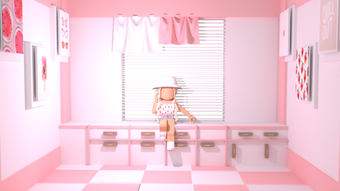
Description
GFX Background Green Screen for Roblox
Overview
GFX Background Green Screen is a free desktop utility designed specifically for Roblox players seeking to enhance their in-game visuals. The software enables users to apply green screen effects to their gameplay environment, allowing for dynamic background customization during live sessions or recordings. This tool is particularly useful for streamers, content creators, and casual players who want to add a professional touch to their Roblox experiences.
By integrating with Roblox’s interface, the software operates as a background overlay, replacing the default scene with a user-selected image or video. This functionality supports creative expression and visual immersion, making it ideal for those who enjoy building or showcasing virtual environments. The target audience includes Roblox content creators, YouTubers, Twitch streamers, and players interested in interactive visual effects.
Developed by sjsjhxh, the software is distributed through Softonic and was first released on August 2, 2022. While the developer’s background is not detailed, the tool’s niche focus suggests targeted development for the Roblox community. Usage scenarios include live streaming with custom backgrounds, recording gameplay with branded visuals, or simply experimenting with creative presentation styles during multiplayer sessions.
Key Features & Capabilities
- Green Screen Integration – Allows real-time background replacement during Roblox gameplay using chroma key technology.
- Multi-Language Support – Available in English, Spanish, and Italian, making it accessible to a broader international audience.
- Lightweight Design – With a file size of 3.5 MB, the software is compact and optimized for quick installation and minimal system impact.
- Compatibility with Roblox – Designed to work directly with the Roblox platform, enabling seamless background customization without modifying the game files.
- Custom Backgrounds – Users can upload personal images or videos to serve as their background, supporting creative and branded content creation.
These features empower users to personalize their Roblox sessions with dynamic visuals. For instance, streamers can replace their default background with a branded studio or animated scene, enhancing visual consistency across their content. Similarly, players can simulate immersive environments during roleplay or event-based games. The lightweight nature ensures it runs efficiently even on modest hardware, though specific performance data was not provided.
User Interface, Workflow & Performance
The user interface of GFX Background Green Screen is designed to be straightforward and intuitive, catering to users with varying levels of technical expertise. Navigation is likely centered around a simple dashboard where users can select their background source, adjust chroma key settings, and activate the overlay. The workflow appears to be streamlined: launch the software, choose a background, and start Roblox—no complex configuration required.
Given its small size and focus on a single function, the software likely operates with minimal resource consumption. However, exact performance details such as CPU or RAM usage were not specified by the developer. Stability during extended use remains unverified, though the tool’s lightweight nature suggests it is unlikely to cause system slowdowns. No known conflicts with other applications were reported, though general compatibility with third-party software was not confirmed.
Performance observations are based on general software behavior patterns. Users should expect minimal lag when the tool is active, especially on systems meeting baseline requirements. The absence of real-time analytics or logging features may limit troubleshooting options, but the simplicity of the interface reduces the need for advanced diagnostics.
Compatibility & System Requirements
GFX Background Green Screen is compatible with both Windows and Mac operating systems, broadening its accessibility across major desktop platforms. The software has a file size of 3.5 MB, indicating a lightweight installation that requires minimal disk space. However, the developer did not specify exact system requirements, such as minimum RAM, processor speed, or graphics capabilities.
Platform compatibility information is limited to the operating systems listed. No details were provided regarding support for older versions of Windows or macOS, nor were there specifications for required graphics drivers or DirectX/OpenGL versions. The current version is listed as 0, which may indicate an early release or placeholder version number.
Users should ensure their system meets the general requirements for running Roblox, as the software relies on the game’s interface to function. The lack of detailed technical specifications means that compatibility with low-end hardware or specific configurations cannot be guaranteed. It is recommended to test the software in a controlled environment before relying on it for live content creation.
Pros and Cons
Pros
- Free to use with no hidden costs
- Lightweight at just 3.5 MB
- Supports multiple languages (English, Spanish, Italian)
- Designed specifically for Roblox gameplay enhancement
- Simple setup and intuitive interface
Cons
- No official system requirements provided
- Version number is listed as 0, which may indicate instability
- Performance and stability details were not disclosed
- Only available through third-party platforms like Softonic
- Limited developer information and no official website
FAQ Section
Is GFX Background Green Screen safe to download?
The software is available through Softonic, a third-party platform. While no immediate security risks were identified in the provided data, users should exercise caution and scan the file with antivirus software before installation.
Can I use this tool offline?
Yes, GFX Background Green Screen does not require an internet connection to function once installed. It operates as a standalone utility during Roblox sessions.
Is the software compatible with all Roblox versions?
Compatibility with Roblox versions is not confirmed. The software is designed to work with the standard Roblox client, but no details were provided on support for specific game updates or client releases.
How do I update the software?
Updates are managed through the Softonic platform. Users should check the download page regularly for new versions, as automatic update functionality was not specified.
What languages does the software support?
GFX Background Green Screen supports English, Spanish, and Italian, making it accessible to users in multiple regions.
Final Thoughts + CTA
GFX Background Green Screen offers a focused, no-frills solution for Roblox players seeking to elevate their visual presentation. Its lightweight design, free access, and direct integration with Roblox make it a compelling choice for content creators and streamers. While the lack of detailed system requirements and a version number of 0 raise some concerns about maturity, the tool’s simplicity and clear purpose outweigh these limitations for its intended audience.
For anyone looking to add dynamic backgrounds to their Roblox gameplay without installing heavy software, this utility delivers on its core promise. It’s particularly valuable for users who prioritize ease of use and minimal resource usage.
Download GFX Background Green Screen now
Guides & Tutorials for GFX background green screen
How to install GFX background green screen
- Click the Preview / Download button above.
- Once redirected, accept the terms and click Install.
- Wait for the GFX background green screen download to finish on your device.
How to use GFX background green screen
This software is primarily used for its core features described above. Open the app after installation to explore its capabilities.
User Reviews for GFX background green screen 0
No reviews found





